
Agents open pull requests faster than anyone can read them.
Shepherd is a native macOS inbox for every pull request from every repository you care about. Triage, review and merge from the keyboard, and know at a glance whether an agent or a person wrote it.
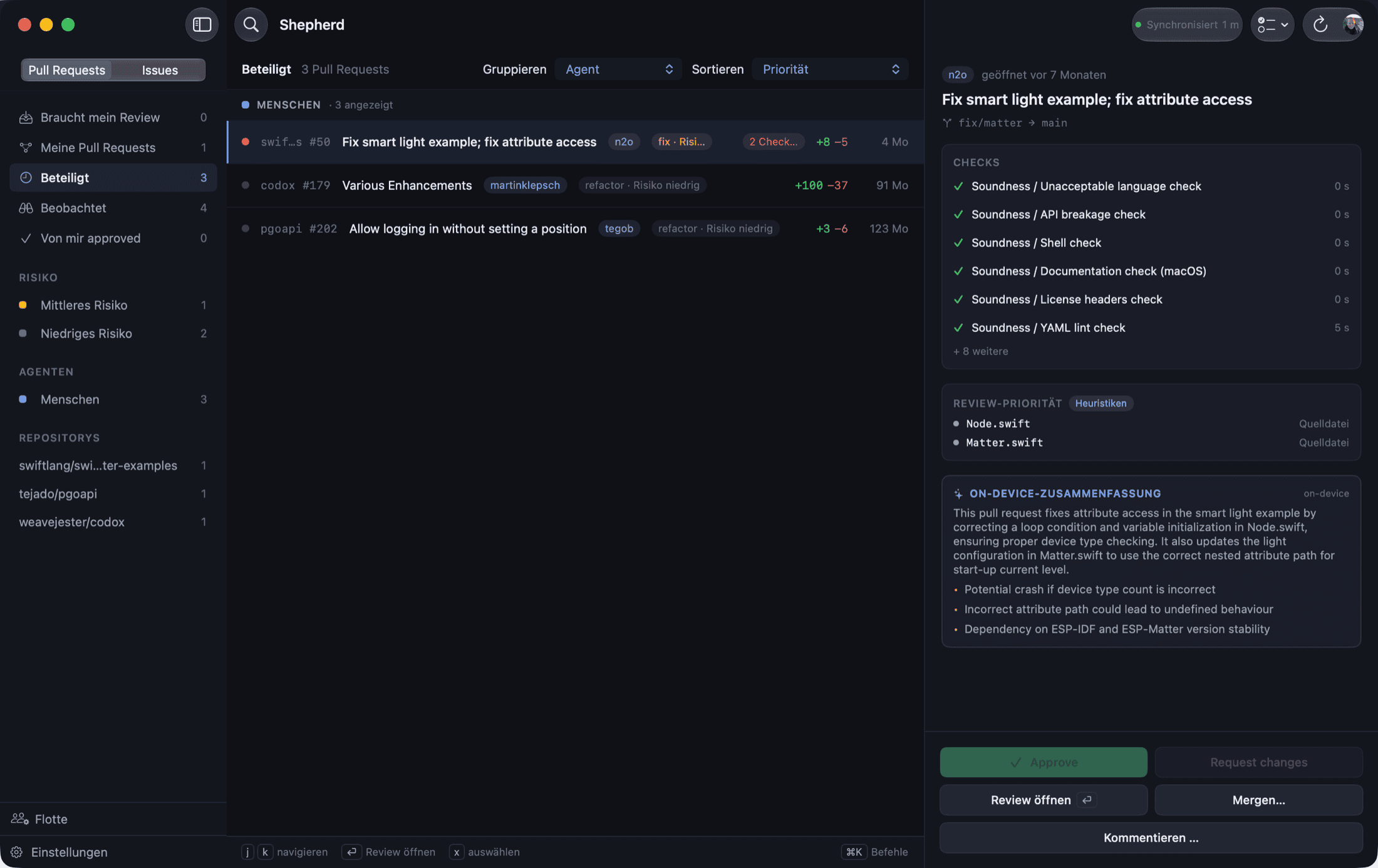
An example of the inbox: five pull requests grouped by who wrote them, with the CI state, the review state and the size of the diff on every row. Press j and k to move the selection.
In a study of 33,596 pull requests written by coding agents, 61 percent had no recorded human review at all. Review tools were built for a world where a person wrote every change. Shepherd is built for the one where they don’t.
“These Aren’t the Reviews You’re Looking For”, arXiv 2605.02273, 2026.One inbox for every repository. Every action from the keyboard.
Shepherd keeps a local copy of what GitHub knows and lets you act on it fast.
Review
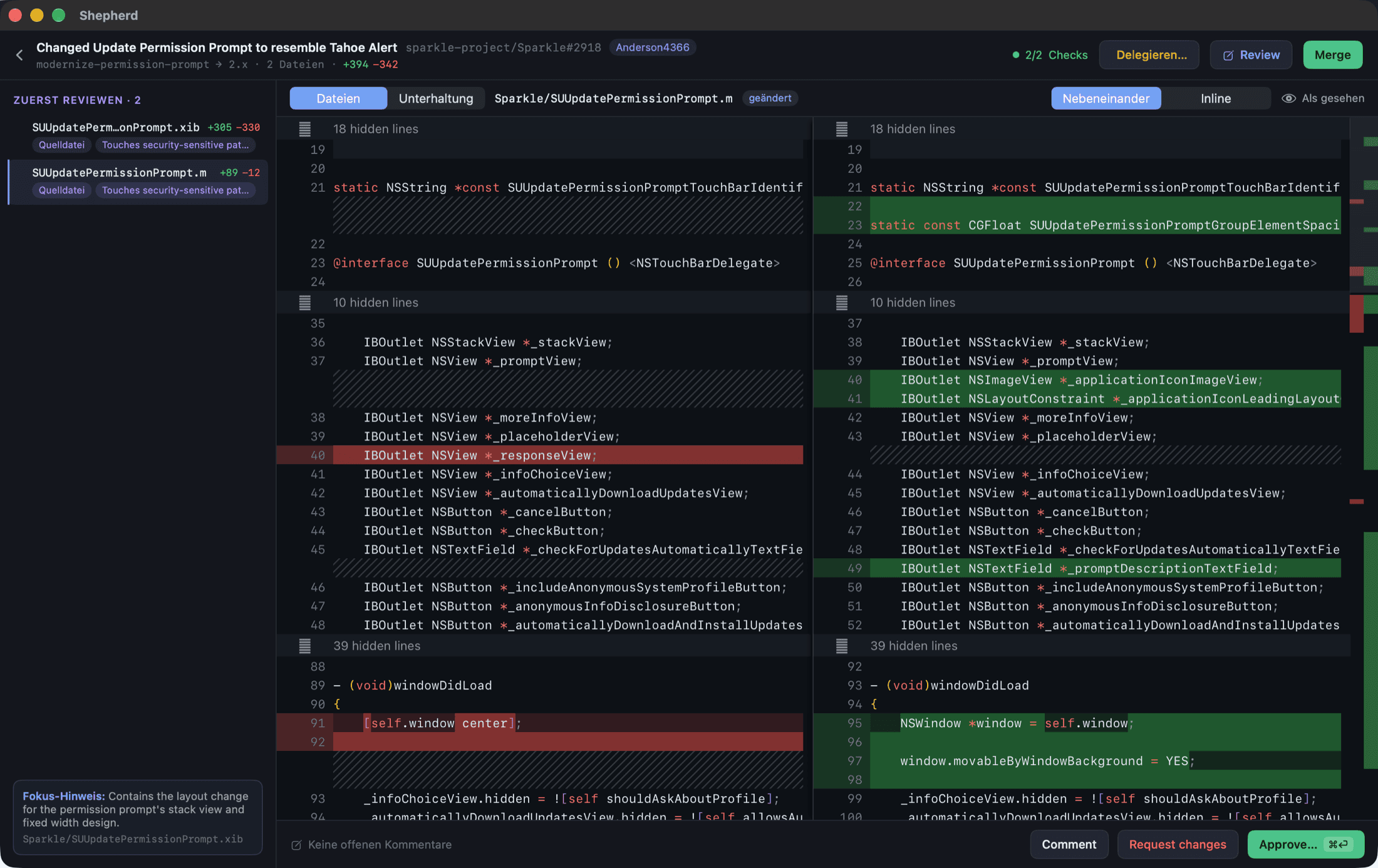
Everything a review needs, without a browser tab.
- Real diffs in the app. Side by side or inline, syntax highlighted, with the files ordered by what deserves attention first.
- Full GitHub parity. Inline comments, pending reviews, approve or request changes, thread replies, checks, and merge, squash or rebase.
- A focus session. One keystroke walks you through every pull request waiting on you, over a queue frozen when you start.
- Saved replies and a checklist. Reusable snippets in every comment field, and a per-repository checklist that prefills an empty review.
Triage
Who wrote it is a fact, not a guess.
- Agent provenance. Claude Code, Copilot, Codex, Devin, Cursor or a person, detected on every row and usable as a filter next to repository and review state.
- Bulk triage. Tick the green agent pull requests and approve or merge them behind one confirmation that lists what it will skip, and why.
- Search that understands. Type what a pull request is about. On-device embeddings of titles, labels, branches and the diffs you have opened, never sent anywhere.
- The fleet. What became of every agent's pull requests: merged, closed, reverted, rounds of changes. Counts, never a score.
Automate
Send work back, on your terms.
- Delegate to Claude Code. Hand a pull request or a single finding to your local agent in an isolated worktree, with turn and budget caps.
- Merge when the checks pass. Decided on the commit you read. If the head moves, the decision expires.
- Auto-merge rules. Agent pull requests that are green, approved and mergeable get merged for you, narrowed by repository and label, with every decision in a local audit log.
- Webhooks, links and a CLI. Signed events into n8n, shepherd:// links, Shortcuts, Spotlight, and a binary that drives the app from a terminal.
Intelligence
Drafts, never submissions.
- On-device first. Heuristics always, Apple's on-device models where available, and your own key if you want one: Anthropic, any OpenAI-compatible endpoint, Konduit or Ollama.
- Editable text. A drafted review summary or inline comment lands in the field for you to change. Nothing is ever sent on your behalf.
- Translate and rewrite in place. An on-device translation appears below the original, and Apple's Writing Tools work in every field you write in.
Two screens
What leaves your Mac, and what never does.
Shepherd is local-first by construction. Pull requests, review drafts, the search index and the audit log live in a SQLite database in your Library folder. Tokens and keys live in the Keychain. There is no Shepherd account and no Shepherd server.
This is the complete list of places the app talks to.
| Where | What | You decide |
|---|---|---|
GitHubapi.github.com | Your pull requests, reviews and merges. Reads through GraphQL, writes through REST, all with the token you signed in with. | Always. That is the job. |
Usage countseu.i.posthog.com | About once a day: the app version, the language, and which features were used, as categories and buckets. No identifier, nothing that could recognise this Mac again, and never a repository, a branch or a line of code. | Off until you say yes when the app first opens, and one click to switch off again in Settings. Counting people rather than launches needs a random ID that is thrown away every month. That is a separate choice on the same screen. |
Updatesgithub.com | A daily check of the release feed. Sends the version you are on and nothing about your system. | Switch it off in Settings. |
An AI endpoint you chooseAnthropic, OpenAI-compatible, Konduit, Ollama | The pull request's title, an excerpt of its description, the list of changed files, the relevant diff excerpt and your own notes, only for the draft you asked for. A colleague's comment never travels to a cloud endpoint. | Off until you enter a key. On-device models need no key and no network. |
A bucket you ownYour S3 endpoint | Every setting and every secret in one object, encrypted on this Mac with AES-256-GCM before it leaves. | Off until you set it up. |
Crash and hang reports, if you turn them on, are written to disk and never uploaded. This page runs no analytics either. The full privacy notice, including the exact list of events and the legal basis for each, is in the repository.
Install in one line.
$ brew install --cask schnaq/tap/shepherdOr download the DMG. Either way the app is notarized by Apple and keeps itself current through Sparkle, so you install once.
Download Shepherd 1.4.0Needs macOS 26 Tahoe on Apple Silicon. Sign in with GitHub through the device flow, or paste a fine-grained personal access token. Release notes